Videos · Rust Fundamentals Applied Program · Week 1
Install and enable Rust Analyzer in VS Code
The Rust Analyzer extension provides code completion, type hints, and hover definitions for Rust projects. It requires a local Rust installation to function and activates automatically when opening Rust files.
Transcript
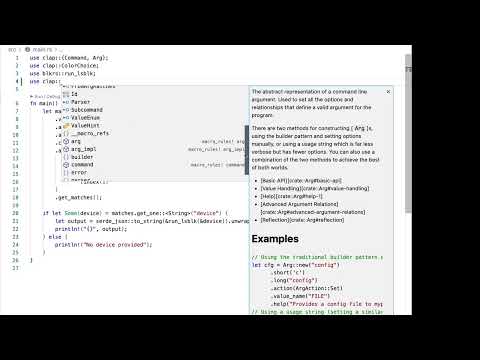
now that we have a visual studio code installed and available let's install the rust analyzer let's go to head over to the extensions and look and search for our rust one of the things that may happen is that you you will get overwhelmed by the amount of results so you can see here there's a lot of things here for rust but what we want is the rust analyzer which is this one if you want to be extra sure you can say analyzer and search for that and you'll filter out some of the things that will show up but definitely the one that you want is this one right here we can actually make this a little bit better and or bigger you'll see it has 1.7 millions million installations in five stars so that's the one that we want and I'm gonna click on this one to see what this is about some of the features is I mean just basic really really high code completion which is something that you would expect from a textator so you start getting into the more ide kind of like related extensions that will give you some enhanced capabilities on your textator so good completion is pretty good but you get some of the hints and the highlighting of code that really works very well but some of the things that I personally like and will be very useful if you're still kind of like trying out rust and want to get more professional with it is that you start getting all of these definitions and types and an explanation of what those are and especially when you're hovering over code which we'll see all throughout this course because we're gonna have the rust analyzer installed and enabled so actually let's go ahead and get this installed I'm gonna click click on the install button here and this is going to take a quick second so when I do these everything will be essentially ready to go but you won't see much anything much different from from just installing so you might be wondering like well how do I know if this is really working well the first thing that you need to know is that this extension tab right here is giving me information about rust and whatnot however it is not rust code so the rust analyzer is not going to really be doing that now anything so but what we need to do here is before anything just make sure the rust is installed otherwise in session the extension is not going to work much because behind the scenes it requires rust to be installed that's why we've installed rust previously before arriving to these steps so I'm gonna close these and luckily enough I'm already in a spot where I have some rust code and I'm going to open up so let's say I'm open up main and you can see rust analyzer shows up here and it was very quick but certain things were showing up right right there in the status so why why is this now showing up because a Visual Studio code is smart enough to say well this is a rust code so there's stuff that is going to happen we have this run and debug thing here that's very useful all these things are especially made available for us because we're using the rust analyzer so now that it's enabled you can see that again it is going to show up here if I click on this one I'll make it run again and then you can see that it's indexing and doing some stuff so that is how you enable it do you install it then you make sure that it's running if I switch over to some other file the rust analyzer will stay there and now that it understands that this is a rust project but in the beginning it might be a little bit confusing to not see the rust analyzer show up and not understanding why that is so it's it's useful enough to or it's enough to actually to just click on one of these rust files and you will be good to go
A new free tutorial every two weeks
Short, practical videos on AI and programming, straight to your inbox. Unsubscribe anytime.