Videos · LLMOps Applied Program · Week 1
Rust development environment setup and Cargo tooling
rustup installs the Rust toolchain and Cargo, which manages project dependencies, formatting, and linting. The Rust Analyzer extension in VS Code provides real-time type checking and code suggestions to streamline development.
Transcript
let's take a look at what a rust development environment would look like in in real life like with a real example you're building command line tools now this is different in many in many ways from python so unlike python where i didn't cover specifically how to install it i will cover how to install these with rust now just a quick reminder that installing rust is only needed for development environments once you build once you release a binary once that's already created then you don't need to have rust installed in your target systems now this is a perfect reason why you want to prefer something like rust when building command line tools it is because you need to have rust installed in your target systems now this is a perfect reason why you want to prefer something like rust when building command line tools it is because you need to have rust installed in your target systems now this is a perfect reason why you want to prefer something like rust when building command line tools it is because you need to have rust installed in your target systems now this is a perfect reason why you want to prefer something like rust when building command line tools it is because you need to have rust installed in your target systems now this is a perfect reason why you want to prefer something like rust when building command line tools it is because you need to have rust installed in your target systems now this is a perfect reason why you want to prefer something like rust when building command line tools it is because you need to have rust installed in your target systems now this is a perfect reason why you want to prefer something like rust when building command line tools it is because you need to have rust installed in your target systems now this is a perfect reason why you want to prefer something like rust when building command line tools it is because you need to have rust installed in your target systems now this is a perfect reason why you want to prefer something like rust when building command line tools it is because you need to have rust installed in your target systems now this is a perfect reason why you want to prefer something like rust when building command line tools it is because you need to have rust installed in your target systems now this is a perfect reason why you want to prefer something like rust when building command line tools it is because you need to have rust installed in your target systems now this is a perfect reason why you want to prefer something like rust when building command line tools it is because you need to have rust installed in your target systems now this is a perfect reason why you want to prefer something like rust when building command line tools it is because you need to have rust installed in your target systems now this is a perfect reason why you want to prefer something like rust when building command line tools it is because you need to have rust installed in your target systems now this is a perfect reason why you want to prefer something like rust when building command line tools it is because you need to have rust installed in your target systems now this is a perfect reason why you want to prefer something like rust when building command line tools it is because you need to have rust installed in your target systems now this is a perfect reason why you want to prefer something like rust when building command line tools it is because you need to have rust installed in your target systems now this is a perfect reason why you want to prefer something like rust when building command line tools it is because you need to have rust installed in your target systems now this is a perfect reason why you want to prefer something like rust when building command line tools it is because you need to have rust installed in your target systems now this is a perfect reason why you want to prefer something like rust when building command line tools it is because you need to have rust installed in your target systems now this is a perfect reason why you want to prefer something like rust when building command line tools it is because you need to have rust installed in your target systems now this is a perfect reason why you want to prefer something like rust when building command line tools it is because you need to have rust installed in your target systems now this is a perfect reason why you want to prefer something like rust when building command line tools it is because you Now, let me scroll all the way to the top. Welcome to Rust. It will create a couple of directories. One is the .rustup, Cargo, which we'll go into later details, into details later once we cover some of the things that happen there with Cargo, which is one of the tools that we will use to install, build, and create dependencies and all of that good stuff. And then you'll have a bin directory, which will be added to your path, which, in fact, is actually covered right here where your shell environments will get updated so that you have access to those paths.
Now, like I said, I already have that installed. In your system, it might look slightly different. If you're using Linux, in this case, I'm using OS X, but it doesn't matter if you're using Linux, you might be tempted to use the package manager. I highly suggest you don't, and you use rustup, like I'm doing right here. For more...
My system. Now, I already have it installed. I'm not going to go through all of the steps. You can go through that. I'm going to say...
I'm going to select number three and cancel the installation and be done with that. Next, what I want to show you is I'm going to come back to all of these shell environments. I'm going to close them up for now. But we're, again, in Visual Studio Code. That's what I recommend.
The extensions for Visual Studio Code are pretty important because they'll allow you to use Rust, and develop Rust. So, Visual Studio Code has the ability to install an extension here. In this case, it's the Rust Analyzer. So, let's quickly search for it. And it's this one right here.
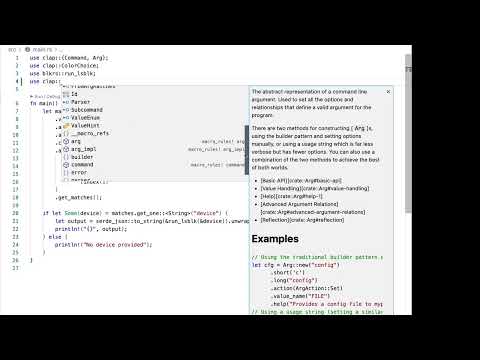
So, I'm going to click on the Rust Analyzer. I already have it installed. If you don't have it installed, you'll be able to select that from here. And it will give you very good feedback when you're developing beyond just code completion, which you also get with the Python extension, when you're writing Python and doing some auto-completion. That's fine, but you will get also the references and some of the searches that are available for your own code as well.
And you'll get documentation when you're hovering over some types and even some definitions as well. Now, beyond the Rust Analyzer, which will also check for any problems you may have with your code, I also want to make sure that you have, GitHub Copilot installed. Now, if you're a student, you can get this for free, but otherwise, you will have to pay for the service. So, if you have it installed, it's not only require you to have it installed, but available for your account. And once you have it installed and ready to use, you'll have this little logo here at the bottom that will indicate that you're good to go and allow you to write faster.
If you're comfortable with Python and not with Rust and you want to try Rust, well, GitHub Copilot, it's an excellent, excellent way to try to get to where you want to be with solid recommendations and code suggestions that might allow you to go faster. Now, beyond that, let's explore very quickly. I'm not going to go into details as to what the code is actually doing. I'm going to open up the File Explorer, some of the components that we're going to be dealing with. Beyond the README and the license, there are a couple of cargo files.
These cargo files are related to packaging. I'm defining my project dependencies here. Those happen automatically with a special cargo command that we'll go into details later. Then the cargo that log lists the dependencies, I have the dependencies and freeze them to exactly what are exactly the things that are needed for my project to work. The git ignore is just a regular version control system.
Git ignore that also gets auto-generated by cargo. You can now see that the cargo is basically everywhere, right? Like this was automatically generated by cargo. We have the cargo log, the cargo toml file. Now, actually, I skipped over that, but it defines my package, which is block rs, similar to the Python project that we saw before.
These will use the same underlying example, the same problem that we're going to solve. Next, you're going to have a target directory when you're building your Rust binaries, those will get in there. There's nothing to do that directory other than all the files that will get produced when you're building, you're compiling, you're creating your binaries. Most of the components, most of the files that you will be working with are in SRC, that's where your Rust files will go. Optionally, you can have a directory called examples where you can put in things that you may want to provide examples for your project, even your command line tool, and we'll have those in this project certainly as well.
So let's very quickly take a look at main.rs. I'm not going to go through the details of the project just yet. GTS is just an introduction to the development environment. So let's see what are some of the things that we're going to be doing here. Now, I mentioned three things that we're going to do with cargo.
I didn't say exactly what are those. One is format, the other one is clippy, and the other one is check. So let's assume that without going into the details of the actual code and what is actually happening here, let's open up a terminal and I'm going to minimize these. And if I say which cargo, I can verify that cargo is indeed installed. So the first thing that we're going to do is use cargo format and the name might be cargo.fmt actually for short, and what that does, I'm going to close the file explorer here, what that does is that it gives you a normalized way of formatting your code.
So let's assume I have that right there. Sorry, I scroll over there. Now, let me move this out of the way. So have like, let's say like on purpose, this very odd, very, very odd formatting here. And let's see what we can do.
So let's assume, hey, I have no idea about rust and I'm making some changes here. If I do cargo.fmt, which is cargo format, everything you will get normalized to a style that is common for rust code. So it gives me confidence that even if I'm not doing things quite right, cargo format can make that happen for me. Next up is clippy. So when I say clear and I say cargo clippy and type that in, it will give me suggestions as to what are some of the things that I can try.
So in this case, I have on line four something. I mean, this is not an error, but it's telling me, hey, you should probably want to use char here if you want to split the command. So how about we try to implement this? Let's go to all the way to line four, which is right here, and then make that change very quickly. I'm going to save that and I'm going to run cargo clippy and cargo clippy said, hey, you know, everything looks pretty good.
And you don't need to do anything else. Well, that sounds great. And that is how you can make sure that you're doing things right, especially if you're not very used to rust. But even if you are a pro in rust, I highly recommend you use some of these calls to cargo that will allow you to get that done. Now clippy and format and all these sort of things will get installed in your system when you do the rust up command that I showed earlier.
And the last one I want to show you is clippy. I'm going to show you a way to do that. So let's say I'm going to do a check and I'm going to do a check and I'm going to run a cargo check. So cargo check will be a way of not compiling but car rust will try to see if there's any problems. So say for example, if I add a semi colon here and try to save that and run cargo check again, we'll get errors with very fast errors with with cargo check.
Now, one of the things is that the rust analyzer extension will call those out. And if I hover and I say, what's see what's going on here with this underline, you'll see that I have mismatched types. That is a problem with rust. Not that is a problem with my code that rust is telling me where it's coming from and that is coming from the rust analyzer. So the rust analyzer is giving me some examples.
This is perfect. And it allows me to do something there. So if I hover over the semi colon, you can see that. I'm saying, hey, remove the semi colon to return its value. Don't try to do that.
So I'm going to remove that, save it, and very quickly everything goes away. Behind the scenes, it is rust analyzer doing all that work for me and making sure that my code is well and is doing good and it will actually compile and giving me suggestions when not to do. So that's very quickly an initial overview of your development environment, kind of like what they would have without going into detail as to what the tool is doing on rust specifically and taking advantage of the readme and all of the documentation that we've shared. So that's it. I highly suggest you use rustup.
The command is right there. Otherwise you can go to the actual website, which is rustup.rs.
A new free tutorial every two weeks
Short, practical videos on AI and programming, straight to your inbox. Unsubscribe anytime.